NomadWiFi
Your laptop is stuck on the worst access point in the building.
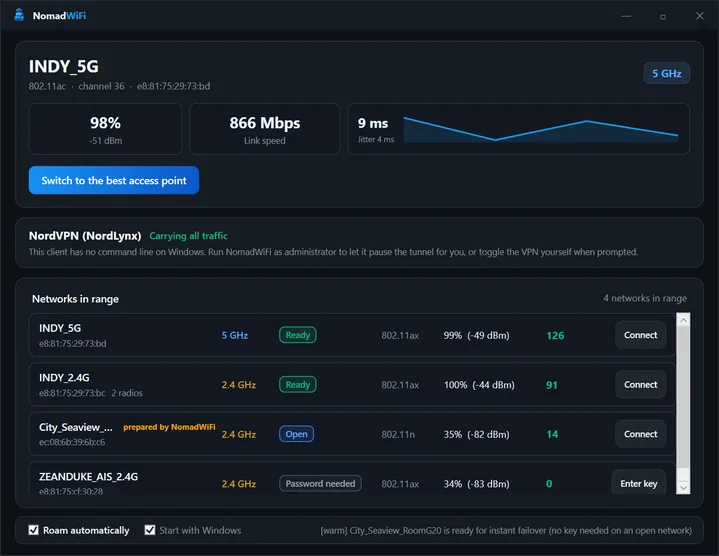
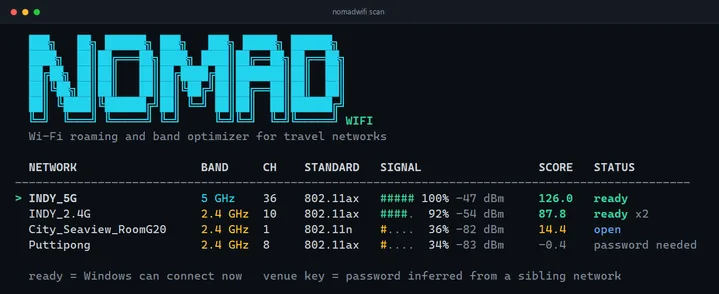
NomadWiFi is a free Windows utility that fixes sticky Wi-Fi: it scores every access point in range and moves you off the one your laptop is needlessly bonded to.
Hotel and cafe Wi-Fi is rarely one network — it is a dozen access points, and Windows will happily stay bonded to the first one it met while reporting 99% link quality. NomadWiFi measures every radio in range and moves you to the one that is actually good.
It ranks access points honestly, scoring measured signal, band, 802.11 standard and BSS-Load airtime congestion rather than trusting the driver’s opinion of the incumbent. It subscribes to the wireless service’s notifications instead of polling, so a dropped link is noticed in around 100 ms — and a roam that fails to carry traffic is rolled back.
It also recognises SSID families like Lobby, Floor2 or anything ending in 5G, pre-writes and verifies per-user profiles for a venue, and deletes guesses that fail twice. Captive portals are detected and never mistaken for a bad access point. VPNs get the off-and-on-again dance automated around the switch: hold the tunnel, roam, verify, resume, flush DNS.
Every command-line operation takes a JSON flag, and there is a desktop app covering the same ground. No admin rights, no driver patches, no service install.
Built for people who work from hotels, cafes and coworking spaces.
How it compares
Against the Windows roaming aggressiveness setting, which is the free thing everyone tries first: that is a single driver-level dial with no visibility into what it is choosing. NomadWiFi measures each access point, tells you why it picked one, and can undo a roam that made things worse.
Against profile managers such as NetSetMan: those switch between networks you have configured. This decides which radio of one network you should be on, which is a different problem.
Against proper enterprise roaming — 802.11k, v and r: where a venue has deployed it correctly, the network already handles this and you do not need NomadWiFi. It exists because hotel and cafe deployments usually have not.
It cannot make a bad access point good. If every radio in the building is congested, the honest answer is that it will find you the least bad one.
BUILT BY Dario Mory
STATUS Shipped — v1.2.0
PRICING Free · MIT
PLATFORM Windows 10 and 11
STACK Go 1.24, WPF (.NET Framework 4.8), Windows Native Wifi API
WEBSITE nomadwifi.mory.dev
GITHUB mory-dev/nomadwifi
Questions
Is NomadWiFi free?
Yes, free and MIT licensed.
Which versions of Windows does it support?
Windows 10 and 11. It uses the Windows Native Wifi API directly, so there is no macOS or Linux build.
Does it need administrator rights?
No. No admin rights, no driver patches and no service install — it runs as a normal user application.
How quickly does it react to a bad connection?
It subscribes to the wireless service notifications rather than polling, so a dropped link is noticed in around 100 ms. A roam that then fails to carry traffic is rolled back automatically.
How does it decide one access point is better than another?
It scores measured signal, band, 802.11 standard and BSS-Load airtime congestion for every radio in range, rather than trusting the driver opinion of the access point you are already on.
Will it break my VPN when it switches?
It automates the sequence instead: hold the tunnel, roam, verify the new link carries traffic, resume the tunnel, flush DNS.
What about hotel captive portals?
Captive portals are detected explicitly and never mistaken for a bad access point, which is the usual failure mode for tools that only watch for internet reachability.
Is there a command-line interface?
Yes. Every command-line operation accepts a JSON flag for scripting, and the desktop app covers the same ground.