Seep
Learn languages while you browse.
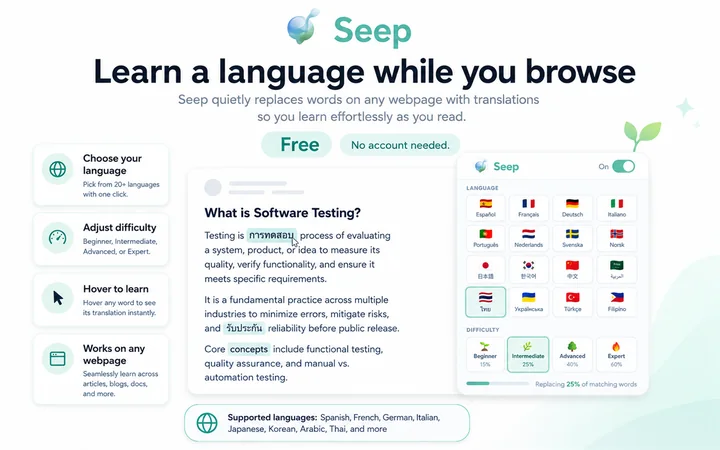
Seep quietly replaces common words on any webpage with their translation. You read normally and absorb a new language without setting time aside for it — no flashcard sessions, no dedicated study block.
Twenty-eight languages ship in one extension, including Spanish, French, German, Italian, Portuguese, Dutch, Japanese, Korean, Mandarin, Hindi, Arabic, Turkish, Russian and Greek. Three difficulty tiers control which words get swapped and how often, so the page stays readable at every level. Hover a translated word to see the original and its language flag; click to hear it pronounced. One keystroke toggles the whole thing off.
The privacy story is a consequence of the architecture rather than a policy: the dictionary is bundled with the extension, there is no backend and no account, and broad site access is an optional permission rather than a required one.
How it compares
Against whole-page translators such as Google Translate: those replace the page so you can read it. Seep leaves the page in your own language and swaps individual words so you have to work slightly for each one. Opposite goals — use a page translator when you need to understand something now.
Against immersion extensions such as Toucan: the same core idea. Seep bundles its dictionary locally rather than calling a service, needs no account, and ships 28 languages in the free version.
Against dedicated study apps such as Anki or Duolingo: Seep has no spaced repetition, no vocabulary list, no progress tracking and no grammar instruction. It is passive exposure while you do something else, which is a supplement to studying rather than a replacement for it.
BUILT BY Dario Mory
STATUS Shipped — v2.0.0 on the Chrome Web Store
PRICING Free
PLATFORM Chrome (Manifest V3)
STACK Vanilla JavaScript, Chrome MV3, Web Speech API
WEBSITE tryseep.com
Questions
Is Seep free?
Yes, completely free, with no account and no sign-up.
How many languages does it support?
Twenty-eight in one extension, including Spanish, French, German, Italian, Portuguese, Dutch, Japanese, Korean, Mandarin, Hindi, Arabic, Turkish, Russian and Greek.
Which browsers does it work in?
Chrome, built on Manifest V3. Version 2.0.0 is on the Chrome Web Store.
Does it send my browsing data anywhere?
No. The dictionary ships inside the extension and there is no backend and no account, so translation needs no network round-trip. Broad site access is an optional permission rather than a required one.
Can I control how much of the page gets translated?
Three difficulty tiers control which words are swapped and how often, so the page stays readable whether you are starting out or nearly fluent.
How do I see the original word again?
Hover a translated word to reveal the original and its language flag, or click it to hear it pronounced.
Can I turn it off on a page?
One keystroke toggles the whole extension off.